色ブロックを表示する
色ブロックを表示する
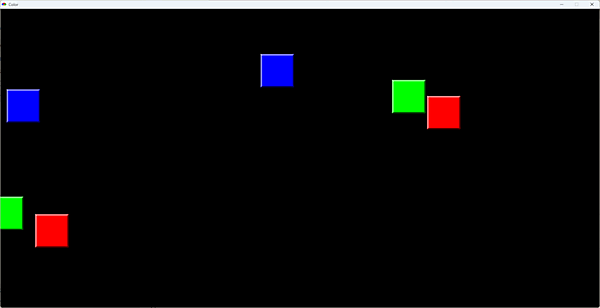
これまではデフォルトの背景色が白っぽかったですが、「Gosu」ライブラリでは黒色がデフォルトです。それから「ColorBlock.rb」ファイルを新規作成してください。色ブロック1個ずつを「ColorBlock」クラスとして定義します。メインループで、メインのゲームである移動する色ブロックを表示します(図3)。
・サンプルコード「ColorBlock.rb」ファイル
class ColorBlock
  attr_accessor :x, :y, :col

  def initialize col
    @x = rand(0..1700)
    @y = rand(0..800)
    @vx = rand(-4..4)
    @vy = rand(-4..4)
    @col = col
  end

  def update
    @x += @vx
    @y += @vy
    if @x < -100 || @y < -100 || @x > 1800 || @y > 900
      return 0
    end
    return 1
  end
end
【サンプルコードの解説】
ColorBlockクラスのコンストラクタで色ブロックの(x,y)座標をランダムにセットし、(vx,vy)移動量をランダムにセットし、色ブロックの色を引数から「@col」プロパティに代入します。
「attr_accessor」で「:x」「:y」「:col」プロパティを、他のオブジェクト指向言語の「public」のように外部からアクセスできるようにします。
「update」メソッドで(x,y)を(vx,vy)だけ移動し、(x,y)座標が画面外に出ていたら戻り値として0を返し、それ以外は1を返します。
・サンプルコード「main.rb」ファイル
require 'gosu'
require_relative 'ColorBlock'

class Game < Gosu::Window
  def initialize
    super 1800, 900
    self.caption = "Color"
    @stage = 2
    @game_state = :title
    @images = []
    @images << Gosu::Image.new("images/0.png")
    @images << Gosu::Image.new("images/1.png")
    @images << Gosu::Image.new("images/2.png")
    @images << Gosu::Image.new("images/Title.png")
    @images << Gosu::Image.new("images/GameOver.png")
    @images << Gosu::Image.new("images/StageClear.png")
    @sounds = []
    @sounds << Gosu::Song.new("sounds/GameStart.ogg")
    @sounds << Gosu::Song.new("sounds/GameOver.ogg")
    @sounds << Gosu::Song.new("sounds/StageClear.ogg")
    @sounds << Gosu::Song.new("sounds/Mix.ogg")
    @rgb = [1,1,1]
    @last_update = Gosu.milliseconds
  end

  def init
    @colors = []
    for i in 0...@stage*3
      @colors << ColorBlock.new(i%3)
    end
  end

  def update
    now = Gosu.milliseconds
    # 10fps = 100msごとに更新
    if now - @last_update >= 100
      case @game_state
      when :main_loop
        flg = 0
        @colors.each do |c|
          flg += c.update()
        end
        if flg == 0
          @game_state = :game_over
          @sounds[1].play()
        end
      end
      @last_update += 100
    end
  end

  def draw
    case @game_state
    when :title
      img = @images[3]
      img.draw((1800-img.width)/2,(900-img.height)/2,1)
    when :main_loop
      @colors.each do |c|
        @images[c.col].draw(c.x, c.y, 1)
      end
    end
  end

  def button_down(id)
    if id == Gosu::MsLeft
      case @game_state
      when :title
        @game_state = :main_loop
        @sounds[0].play()
        init()
      when :main_loop
        @colors.each do |c|
          if c.click(mouse_x,mouse_y) == true
            c.x = 100000
            @rgb[c.col] += 1
            @sounds[3].play()
            return
          end
        end
      end
    end
  end
end

Game.new.show
【サンプルコードの解説】
「Game」クラスのコンストラクタでステージを2にセットします。「milliseconds」で現在のミリ秒を「@last_update」に取得します。記事を書きやすくする都合上、背景色「@rgb」プロパティを先に宣言しています。
「init」メソッドで「@colors」配列に色ブロックを追加します。
「update」メソッドで現在のミリ秒を「now」変数に代入し、前フレームからの経過時間が100ms以上ならゲーム状態に応じた処理を行います。メインループではすべての色ブロックのupdateメソッドを呼び出し、flgが0になりすべて画面外に出たと分かったらゲームオーバーにしてサウンドを再生します。最後の更新@last_updateに100msだけ加算します。
「draw」メソッドでは、ゲーム状態がタイトルの時はタイトル画面を描画します。
メインループの時はすべての色ブロックを描画します。
ゲームオーバー画面を表示する
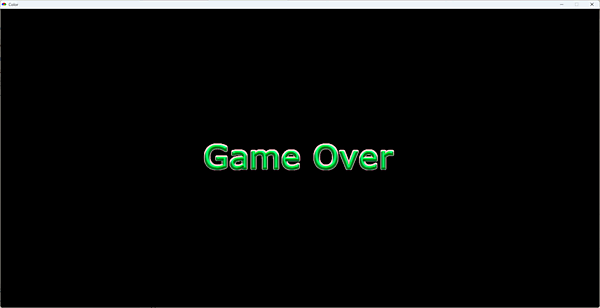
色ブロックが画面外に出たら、ないものとして判断します。色ブロックをクリックしたらx座標を100,000に設定し、画面外に移動させます。すべての色ブロックが画面外に出たらゲームオーバー処理(画面表示)を行います(図4)。
・サンプルコード「ColorBlock.rb」ファイル
class ColorBlock
  attr_accessor :x, :y, :col

  def initialize col
(中略)
  end

  def update
(中略)
  end

  def click x,y
    if (@x+50-x).abs < 50 && (@y+50-y).abs < 50
      return true
    end
    return false
  end
end
【サンプルコードの解説】
ColorBlockクラスの「click」メソッドでクリック座標が色ブロック内にあるか判定し、あれば戻り値としてtrueを返し、なければfalseを返します。
・サンプルコード「main.rb」ファイル
require 'gosu'
require_relative 'ColorBlock'

class Game < Gosu::Window
  def initialize
(中略)
  end

  def init
(中略)
  end

  def update
    now = Gosu.milliseconds
    # 10fps = 100msごとに更新
    if now - @last_update >= 100
      case @game_state
      when :main_loop
        flg = 0
        @colors.each do |c|
          flg += c.update()
        end
        if flg == 0
          @game_state = :game_over
          @sounds[1].play()
        end
      end
      @last_update += 100
    end
  end

  def draw
    case @game_state
    when :title
      img = @images[3]
      img.draw((1800-img.width)/2,(900-img.height)/2,1)
    when :main_loop
      @colors.each do |c|
        @images[c.col].draw(c.x, c.y, 1)
      end
    when :game_over
      img = @images[4]
      img.draw((1800-img.width)/2,(900-img.height)/2,1)
    end
  end

  def button_down(id)
    if id == Gosu::MsLeft
      case @game_state
      when :title
        @game_state = :main_loop
        @sounds[0].play()
        init()
      when :main_loop
        @colors.each do |c|
          if c.click(mouse_x,mouse_y) == true
            c.x = 100000
            @rgb[c.col] += 1
            @sounds[3].play()
            return
          end
        end
      when :game_over
        @game_state = :title
      end
    end
  end
end

Game.new.show
【サンプルコードの解説】
Gameクラスのupdateメソッドで、色ブロックが1個もなければflgが0になるので、ゲーム状態をゲームオーバーにしサウンドを再生します。
drawメソッドでは、ゲームオーバー時にゲームオーバー画像を表示します。
button_downメソッドでは、メインループ時に色ブロックがクリックされたら背景色「@rgb」配列の対応する色の要素をインクリメントし、混色音を再生します。ゲームオーバー時にはゲーム状態をタイトルにセットします。
お絵描きソフト「CLIP STUDIO PAINT」などを開発するセルシス社の2026年7月の時価総額は700億円。アンパンマンの総売上は8兆円。ストーリーのあるコンテンツを生み出すことが大事なのでしょう。ソフトを作る方は得意なのですが、ストーリー作りは苦手です…。
この記事をシェアしてください
関連記事

「C言語」の「RayLib」でコンソールゲーム「Color」を開発してみよう
8月26日 6:30

「Visual Basic.NET」の「Windows Forms」でデスクトップゲーム「Color」を開発してみよう
6月24日 6:30

「C#」の「Forms」でデスクトップゲーム「Color」を開発してみよう
6月3日 6:30

「Kotlin」の「Swing」「Java2D」でデスクトップゲーム「Color」を開発してみよう
9月16日 6:30

「Go」の「Fyne」でデスクトップゲーム「Color」を開発してみよう
5月13日 6:30

「jQuery」でWebゲーム「Color」を開発してみよう
2月18日 6:30
バックナンバー


この記事の筆者
筆者の人気記事

「Java」の「Swing」「Java2D」でデスクトップゲーム「Color」を開発してみよう
4月22日 6:30
「Kotlin」の「Swing」「Java2D」でデスクトップゲーム「Color」を開発してみよう
9月16日 6:30

「C/C++」の「RayLib」でコンソールゲーム「Color」を開発してみよう
7月15日 6:30
「Visual Basic.NET」の「Windows Forms」でデスクトップゲーム「Color」を開発してみよう
6月24日 6:30
「C言語」の「RayLib」でコンソールゲーム「Color」を開発してみよう
8月26日 6:30

「Ruby」の「Gosu」でデスクトップゲーム「Color」を開発してみよう
8月5日 6:30
Think ITでは、技術情報が詰まったメールマガジン「Think IT Weekly」の配信サービスを提供しています。メルマガ会員登録を済ませれば、メルマガだけでなく、さまざまな限定特典を入手できるようになります。