


"page"のプロパティ設定
"page"のプロパティ設定
"org.eclipse.ui.propertyPages"を右クリックします。表示されたポップアップ・メニューから「新規」-「page」を選択し、"page"のプロパティを以下のように設定し、保管します。
| プロパティ | 値 |
| 内容 | |
| id | examples.hello2.pages.SamplePropertyPage |
| プロパティ・ページを識別するID | |
| name | サンプル・プロパティー・ページ |
| 表示される名前 | |
| objectClass | org.eclipse.jdt.core.IJavaProject |
| プロパティ・ページが登録されるクラスの完全修飾名 | |
| class | examples.hello2.pages.SamplePropertyPage |
| org.eclipse.ui.IWorkbenchPropertyPageインターフェースを実装するクラス(プロパティ・ページ・クラス) | |
| icon | 値:なし |
| アイコンのパス | |
| nameFilter | 値:なし |
| オブジェクト名によってプロパティ・ページを登録するときのワイルドカード・マッチ条件 | |
| adaptable | 値:なし |
| objectClassで指定したクラスがorg.eclipse.core.resources.IResourceに適合する型のときに、このプロパティ・ページを使用するかどうかを示すフラグ。デフォルトは、"false" |
クラスを作成し、プロパティ・ページを追加
概要」ページの「すべての拡張」から「org.eclipse.ui.propertyPages」-「サンプル・プロパティー・ページ」を選択し、「拡張エレメント詳細」の「class」リンクをクリックして、 examples.hello2.pages.SamplePropertyPageクラスを作成します。
次にSamplePropertyPageクラスに以下のようにコードを記述します。
public class SamplePropertyPage extends PropertyPage implements IWorkbenchPropertyPage {
public SamplePropertyPage() {
super();
}
protected Control createContents(Composite parent) {
Label label = new Label(parent, SWT.NONE);
label.setText("Hello, Eclipse world");
return label;
}
}  マニフェスト・エディターによって生成されたSamplePropertyPageクラスは、org.eclipse.ui.dialogs.PropertyPage抽象クラスを継承し、IWorkbenchPropertyPageインターフェースをインプリメントしています。
以上で、プロパティ・ページを追加することができました。ワークベンチ・ランタイムを起動し、Javaプロジェクトを右クリックし、ポップアップ・メニューから「プロパティ」を選択してみてください(図2)。
これまでに、プロパティ・ページを追加する手順について説明しました。次に、拡張ポイントとプロパティ・ページ・クラスについて説明します。
拡張ポイント
拡張する拡張ポイントは、"org.eclipse.ui.propertyPages"で、extension要素の構造を図4にまとめました。

図4:"org.eclipse.ui.propertyPages"のextension要素の構造
プロパティ・ページ・クラス
プロパティ・ページ・クラスでは、プロパティ・ページの機能を実装します。プロパティ・ページ・クラスは、org.eclipse.ui.IWorkbenchPropertyPageインターフェースをインプリメントしなければいけません。
IWorkbenchPropertyPageインターフェースを中心にインターフェースやクラスの関係を図5に示します。
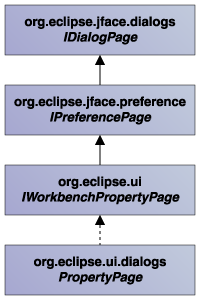
図5:IWorkbenchPropertyPageインターフェースとPropertyPageクラス
「プロパティ・ページの追加」で作成したSamplePropertyPageクラスで継承したPropertyPage抽象クラスは、IWorkbenchPropertyPageインターフェースやその他のインターフェースで定義されているメソッドを実装していますが、プロパティ・ページ・クラスでは、もう1つcreateContentsメソッドを実装する必要があります(表1)。
| メソッド | 内容 |
| createContents | GUIコンポーネント作成などを実装 |
この記事をシェアしてください
バックナンバー
この記事の筆者

Think ITでは、技術情報が詰まったメールマガジン「Think IT Weekly」の配信サービスを提供しています。メルマガ会員登録を済ませれば、メルマガだけでなく、さまざまな限定特典を入手できるようになります。

