Public Class EarthQuakeInfomation
  Property title As String
  Property description As String
  Property link As String
  End Class

Public NotInheritable Class MainPage
  Inherits Page
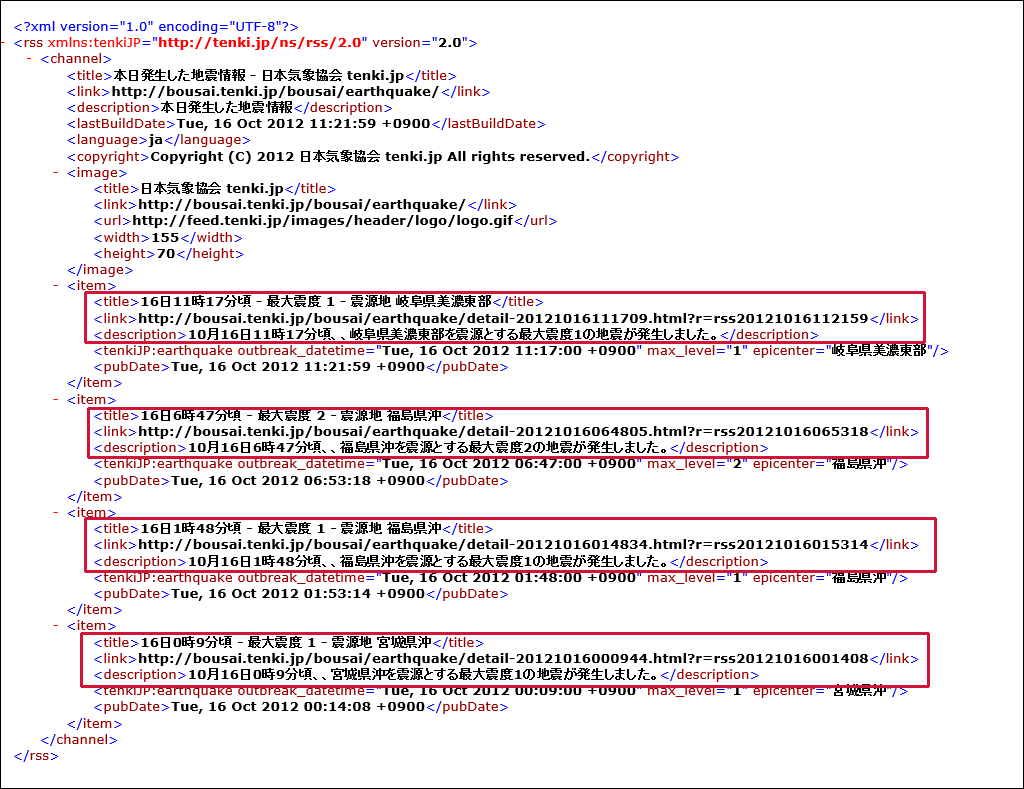
Descendantsメソッドで、全ての子孫要素内の要素を変数resultに格納しながら、以下の処理を反復します。 EarthQuakeInformationクラスのtitleプロパティに要素の値を、descriptionプロパティに<description>要素の値を、linkプロパティに<link>要素の値を指定して、AddメソッドでmyEarthQuakeInfomationオブジェクトに追加していきます。<br /> GridViewのItemsSourceプロパティにmyEarthQuakeInfomationオブジェクトを追加します。<br /> これで、地震の「タイトル」と「概要」がタイルに表示されます。TitleTextBoxに発生した地震の日付を表示します。</p>
<p>非同期処理で行われるため、メソッドの先頭にAsyncを追加します。</p>
<pre class="brush: plain; " type="syntaxhighlighter"> Protected Overrides Async Sub OnNavigatedTo(e As Navigation.NavigationEventArgs) Dim myUrl = "http://feed.tenki.jp/component/static_api/rss/earthquake/recent_entries_by_day.xml" Dim myHttpClient As New HttpClient Dim myResult As String = Await myHttpClient.GetStringAsync(myUrl) myResult = myResult.Replace("<rss version=" &ChrW(34) & "2.0" &ChrW(34) & " xmlns:tenkiJP=" &ChrW(34) & "http://tenki.jp/ns/rss/2.0" &ChrW(34) & ">", "<rss>") myResult = myResult.Replace("tenkiJP:earthquake epicenter", "earthquake epicenter") Dim xmldoc As XElement = XElement.Parse(myResult) Dim myDate As String = xmldoc.Descendants("lastBuildDate").Value Dim earthDate As String = myDate.Substring(0, 16) Dim myEarthQuakeInfomation As New List(Of EarthQuakeInfomation) For Each result In From c In xmldoc.Descendants("item") Select c With myEarthQuakeInfomation .Add(New EarthQuakeInfomation With {.title = result.Element("title").Value, .description = result.Element("description").Value, .link = result.Element("link").Value}) End With Next GridView1.ItemsSource = myEarthQuakeInfomation TitleTextBlock.Text = earthDate& " の地震" End Sub
</pre>
<h4>GridViewの項目が選択された時の処理</h4>
<p>変数myUrlに、GridViewから選択された項目を、EarthQuakeInfomationクラスにキャストして、そのlinkプロパティの値を取得して格納します。取得したUrlを引数にWebBrowserPageに遷移します。</p>
<pre class="brush: plain; " type="syntaxhighlighter"> Private Sub GridView1_SelectionChanged(sender As Object, e As SelectionChangedEventArgs) Handles GridView1.SelectionChanged Try myFrame.Visibility = Windows.UI.Xaml.Visibility.Visible Dim myUrl As String = DirectCast(GridView1.SelectedItem, EarthQuakeInfomation).link myFrame.Navigate(GetType(WebBrowserPage), myUrl) Catch myFrame.Visibility = Windows.UI.Xaml.Visibility.Collapsed End Try End Sub
</pre>
<h4>←アイコンがクリックされた時の処理</h4>
<p>WebBrowserPageを表示しているmyFrameを非表示にします。</p>
<pre class="brush: plain; " type="syntaxhighlighter"> Private Sub backButton_Click(sender As Object, e As RoutedEventArgs) Handles backButton.Click myFrame.Visibility = Windows.UI.Xaml.Visibility.Collapsed End Sub
End Class
</pre>
<p>次に、ソリューションエクスプローラー内のWebBrowserPage.xamlを展開して表示される、WebBrowserPage.xaml.vbをダブルクリックして、リスト4のコードを記述します。</p>
<h3>ロジックコードを記述する</h3>
<h4>リスト4 (WebBrowserPage.xaml.vb)</h4>
<pre class="brush: plain; " type="syntaxhighlighter">Option Strict On
Public NotInheritable Class WebBrowserPage Inherits Page
</pre>
<h4>ページがアクティブになった時の処理</h4>
<p>MainPage.xamlから渡された引数(Url)は、e.Parameterで取得できます。これはObject型であるため、DirectCastでString型にキャストして、変数myUriに格納します。</p>
<p>WebBrowserのSourceプロパティにmyUriの値を指定します。これでWebBrowser内に該当する地震のページが表示されます。</p>
<pre class="brush: plain; " type="syntaxhighlighter"> Protected Overrides Sub OnNavigatedTo(e As Navigation.NavigationEventArgs) Dim myUri As String = DirectCast(e.Parameter, String) WebBrowser1.Source = New Uri(myUri, UriKind.Absolute) End Sub
End Class
</pre>
<p>今回はここまでです。ありがとうございました。</p>
<h3>筆者からのお知らせ</h3>
<p>筆者はWindowsストアでアプリを公開しています。チャームの検索からWindowsストアを選択して、検索欄に、kuniyasuまたはYakushijiKuniyasuと入力すると、公開されているアプリの一覧が表示されます。上記はどちらも私のアカウントですので、興味のある方は是非ダウンロードして使ってみてください。</p>
</body></html>