


Windows Phoneアプリ制作からマーケットプレイス公開までを完全ガイド! 第12回
結果表示ウィンドウのレイアウト(MyClinometer.xaml)
結果表示ウィンドウのレイアウト(MyClinometer.xaml)
このようにしてレイアウトした設定画面の上に、結果表示ウィンドウを重ねてレイアウトします(図13)。
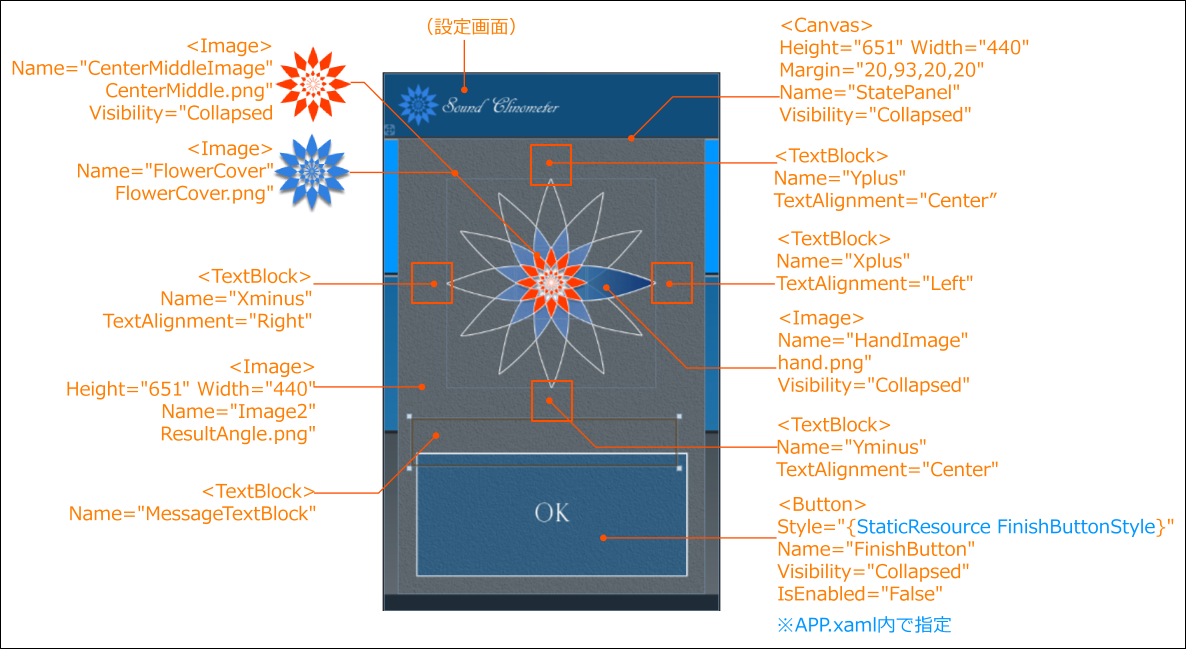 | 図13:結果表示ウィンドウのレイアウト(クリックで拡大) |
このページでレイアウトした「OK」ボタンのスタイルについては、リスト8のコードをApp.xaml内の
リスト8 App.xaml内に追加する、「OK」ボタンのスタイル設定(App.xaml)
      <Style x:Key="FinishButtonStyle" TargetType="Button">
        <Setter Property="Template">
          <Setter.Value>
            <ControlTemplate TargetType="Button">
              <Grid>
                <Image x:Name="FinishButtonImage" Source="/SoundClinometer;component/Image/FinishButtonImage.png" Stretch="Fill"/>
              </Grid>
            </ControlTemplate>
          </Setter.Value>
        </Setter>
      </Style>
この結果表示ウィンドウは、「START」ボタンがタップされるまでは非表示としておくため、Visibilityプロパティに「Collapsed」を指定します(図14)。
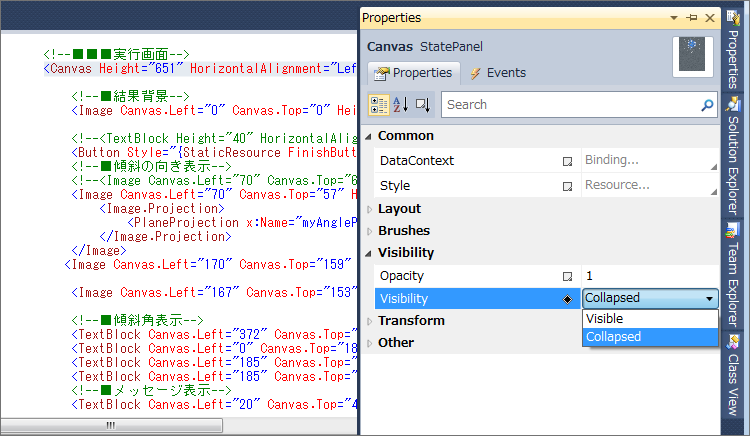 | 図14:Visibilityプロパティに「Collapsed」を指定して非表示状態にしておく(クリックで拡大) |
完成したデザイン・コード
プロパティを指定して完成した、設定画面と結果表示ウィンドウから成る処理ページのデザイン・コードはリスト9のようになります。
リスト9 完成した処理ページのデザイン・コード(MyClinometer.xaml)
<phone:PhoneApplicationPage
    x:Class="SoundClinometer.MyClinometer"
    xmlns="http://schemas.microsoft.com/winfx/2006/xaml/presentation"
    xmlns:x="http://schemas.microsoft.com/winfx/2006/xaml"
    xmlns:phone="clr-namespace:Microsoft.Phone.Controls;assembly=Microsoft.Phone"
    xmlns:shell="clr-namespace:Microsoft.Phone.Shell;assembly=Microsoft.Phone"
    xmlns:d="http://schemas.microsoft.com/expression/blend/2008"
    xmlns:mc="http://schemas.openxmlformats.org/markup-compatibility/2006"
    FontFamily="{StaticResource PhoneFontFamilyNormal}"
    FontSize="{StaticResource PhoneFontSizeNormal}"
    Foreground="{StaticResource PhoneForegroundBrush}"
    SupportedOrientations="Portrait" Orientation="Portrait"
    mc:Ignorable="d" d:DesignHeight="768" d:DesignWidth="480"
    shell:SystemTray.IsVisible="True">

    <!--LayoutRoot is the root grid where all page content is placed-->
    <Grid x:Name="LayoutRoot" Background="Transparent">
      <Grid.RowDefinitions>
        <RowDefinition Height="Auto"/>
        <RowDefinition Height="*"/>
      </Grid.RowDefinitions>

      <!--ContentPanel - place additional content here-->
      <Grid x:Name="ContentPanel" Grid.Row="1" Margin="0,0,0,0" Background="White">
        <!--■背景-->
        <Image Canvas.Left="0" Canvas.Top="0" Height="768" Name="SettingBackImage" Stretch="Fill" Width="480" Source="/SoundClinometer;component/Image/BackImage.png" />

        <!--■設定画面-->
        <Canvas Height="768" HorizontalAlignment="Left" Margin="0,0,0,0" Name="PreferencesPanel" VerticalAlignment="Top" Width="480">

        <!--●角度選択-->
        <Image Canvas.Left="27" Canvas.Top="169" Height="85" x:Name="DrawAngle" Stretch="Fill" Width="85" Source="/SoundClinometer;component/Image/DrawAngle.png" />

        <Image Canvas.Left="27" Canvas.Top="169" Height="83" x:Name="WindowsPhone" Stretch="Fill" Width="88" Source="/SoundClinometer;component/Image/WindowsPhone.png">
          <Image.Projection>
            <PlaneProjection x:Name="myPhoneProjection" CenterOfRotationX="0" CenterOfRotationY="0" />
          </Image.Projection>
        </Image>

        <!--●背景カバー-->
        <Image Canvas.Left="0" Canvas.Top="96" Height="649" x:Name="BackImageCover" Stretch="Fill" Width="480" Source="/SoundClinometer;component/Image/CoverImage.png" />

        <!--●角度選択-->
        <TextBlock Height="35" HorizontalAlignment="Left" x:Name="AngleLabel" Text="Range: " VerticalAlignment="Top" Width="71" FontSize="24" Canvas.Left="30" Canvas.Top="126" Foreground="White"/>
        <TextBlock Height="47" HorizontalAlignment="Left" x:Name="AngleValueText" Text="1°" VerticalAlignment="Top" Width="71" FontSize="40" TextAlignment="Center" Canvas.Left="108" Canvas.Top="108" Foreground="White"/>
        <Rectangle x:Name="SliderBorder1" Height="14" Canvas.Left="116" Canvas.Top="166" Width="337" Stroke="White"/>
        <Slider Height="100" HorizontalAlignment="Left" x:Name="AngleSlider" VerticalAlignment="Top" Width="360" Minimum="0" SmallChange="1" BorderBrush="#FFFF5200" Maximum="90" LargeChange="1" Value="1" Canvas.Left="105" Canvas.Top="137" />

        <!--●サウンド選択-->
        <Button Style="{StaticResource BellButtonStyle}" Canvas.Left="115" Canvas.Top="315" Content="Button" Height="100" x:Name="BellButton" Width="100" />
        <Button Style="{StaticResource TweetButtonStyle}" Canvas.Left="235" Canvas.Top="315" Content="Button" Height="100" x:Name="TweetButton" Width="100" />
        <Button Style="{StaticResource VoiceButtonStyle}" Canvas.Left="355" Canvas.Top="315" Content="Button" Height="100" x:Name="VoiceButton" Width="100" />

        <!--●ボリューム設定-->
        <Image Canvas.Left="25" Canvas.Top="420" Height="65" Name="HeadphoneImage" Stretch="Fill" Width="82" Source="/SoundClinometer;component/Image/Headphone.png" />

        <Path Data="M146.93466,273.24081 L423.00073,273.3342 L423.00073,224.80177 z" Height="36" Canvas.Left="116" Stretch="Fill" Canvas.Top="431" UseLayoutRounding="False" Width="337">
          <Path.Fill>
            <LinearGradientBrush EndPoint="0.996,0.993" StartPoint="0,1">
              <GradientStop Color="#FF0080E2" Offset="0"/>
              <GradientStop Color="#FF0C3B5C" Offset="1"/>
            </LinearGradientBrush>
          </Path.Fill>
        </Path>
        <Rectangle x:Name="SliderBorder2" Height="14" Canvas.Left="116" Canvas.Top="467" Width="337" Stroke="White"/>
        <Slider Canvas.Left="105" Canvas.Top="440" Height="96" x:Name="VolumeSlider" Width="360" LargeChange="1" Maximum="10" Value="3" BorderBrush="#FFFF5200" />
        <TextBlock Text="3" Canvas.Left="202" Canvas.Top="428" Height="40" x:Name="ShowVolume" Width="40" FontSize="26" TextAlignment="Center" Foreground="White"/>

        <!--●「START」ボタン-->
        <Button Style="{StaticResource StartButtonStyle}" Content="START" Height="177" HorizontalAlignment="Left" x:Name="StartButton" VerticalAlignment="Top" Width="388"  Canvas.Left="47" Canvas.Top="542" />
        </Canvas>

        <!--■実行画面-->
        <Canvas Height="651" HorizontalAlignment="Left" Margin="20,93,20,20" Name="StatePanel" VerticalAlignment="Top" Width="440" Visibility="Collapsed">
        <!--●結果背景-->
        <Image Canvas.Left="0" Canvas.Top="0" Height="651" Name="Image2" Stretch="Fill" Width="440" Source="/SoundClinometer;component/Image/ResultAngle.png" />

        <!--●「OK」ボタン-->
        <Button Style="{StaticResource FinishButtonStyle}" Content="OK" Height="177" HorizontalAlignment="Left" Name="FinishButton" VerticalAlignment="Top" Width="388"  Canvas.Left="27" Canvas.Top="449" Background="#FFE61400" FontSize="28" Visibility="Collapsed" IsEnabled="False" />

        <!--●傾斜の向き表示-->
        <Image Canvas.Left="70" Canvas.Top="57" Height="300" Name="HandImage" Stretch="Fill" Width="300" Source="/SoundClinometer;component/Image/hand.png" Visibility="Collapsed">
          <Image.Projection>
            <PlaneProjection x:Name="myAngleProjection"/>
          </Image.Projection>
        </Image>
        <Image Canvas.Left="170" Canvas.Top="159" Height="100" Name="FlowerCover" Stretch="Fill" Width="100" Source="/SoundClinometer;component/Image/FlowerCover.png" />
        <Image Canvas.Left="167" Canvas.Top="153" Height="106" Name="CenterMiddleImage" Stretch="Fill" Width="106" Source="/SoundClinometer;component/Image/CenterMiddle.png" Visibility="Collapsed" />

        <!--●傾斜角表示-->
        <TextBlock Canvas.Left="372" Canvas.Top="185" Height="60" Name="Xplus" Text="" Width="80" TextAlignment="Left" FontSize="32" Foreground="White"/>
        <TextBlock Canvas.Left="0" Canvas.Top="185" Height="60" Name="Xminus" Text="" Width="70" TextAlignment="Right" FontSize="32" Foreground="White"/>
        <TextBlock Canvas.Left="185" Canvas.Top="16" Height="60" Name="Yplus" Text="" Width="80" TextAlignment="Center" FontSize="32"  Foreground="White"/>
        <TextBlock Canvas.Left="185" Canvas.Top="353" Height="60" Name="Yminus" Text="" Width="80" TextAlignment="Center" FontSize="32" Foreground="White"/>

        <!--●メッセージ表示-->
        <TextBlock Canvas.Left="20" Canvas.Top="400" Height="68" Name="MessageTextBlock" Text="" Width="380" FontSize="22" TextAlignment="Center" Foreground="White"/>
      </Canvas>
    </Grid>
  </Grid>
</phone:PhoneApplicationPage>
「Sound Clinometer Ver.0.8」プロジェクト一式
You don't have access to download this file.
- この記事のキーワード
この記事をシェアしてください
バックナンバー


この記事の筆者

Think ITでは、技術情報が詰まったメールマガジン「Think IT Weekly」の配信サービスを提供しています。メルマガ会員登録を済ませれば、メルマガだけでなく、さまざまな限定特典を入手できるようになります。

