


「Terraform」でコードをモジュール化して、環境を分離することで適切に管理しよう
第16回の今回は、「Terraform」のコードをモジュール化し、ディレクトリを分離することで環境を適切に管理する方法について解説します。
2025年11月25日 6:30
はじめに
第15回は「Terraform」を使ってAWSインフラをコード化し、再現可能な環境を構築する方法を学びました。VPC、EKS、ECRなどのリソースをコードで管理すると、手動構築の課題を解決できることを確認しました。
しかし、第15回で構築した環境には、チーム開発で使用する上でいくつかの課題が残っています。
- 本番環境への安全なデプロイ
開発環境と本番環境で同じコードを使いたいものの、環境ごとの設定を管理する仕組みが整っていません。また、本番環境へのデプロイは慎重に行う必要がありますが、手動実行では人的ミスのリスクがあります。 - 状態ファイルの共有問題
Terraformの状態ファイル(terraform.tfstate)はローカルに保存されているため、他のチームメンバーと共有できません。例えば、AさんとBさんがそれぞれ自分のPCから同じインフラを変更しようとすると状態ファイルが同期されず、リソースの重複作成や予期しない削除が発生する可能性があります。 - 同時実行による競合
複数人が同時にterraform applyを実行すると状態ファイルの競合が発生し、インフラが壊れる危険性があります。ロック機構がないため、誰かが作業中であることを他のメンバーが知る手段がありません。 - 変更の追跡とレビューが困難
ローカルでterraform applyを実行すると誰がいつ何を変更したのかが記録されません。アプリケーションコードのようにプルリクエストでレビューするワークフローが確立されていないため、意図しない変更や設定ミスを事前に防ぐことができません。
これらの課題を解決するために、今回から3回に渡って解説していきます。Terraformをチーム開発で活用するためのベストプラクティスを学びましょう。
- 第16回(本記事): 環境の分離とモジュール化(課題1の解決)
- 第17回: リモートバックエンドによる状態管理(課題2、3の解決)
- 第18回: CI/CDパイプラインとの統合(課題4の解決)
本記事では、第15回で作成したTerraformコード(VPC、EKS、ECRの構成)をベースにディレクトリごとに環境を分離し、モジュールでコードを再利用する方法を学びます。第15回のフラット構成をチーム開発向けの構成にリファクタリングする内容となっています。お手元に第15回のコードを準備してから読み進めてください。コードがない場合は第15回を参考に環境を構築してください。
環境の分離
開発環境と本番環境など複数の環境を管理する場合、どのように環境を分離すべきでしょうか。本セクションでは、推奨される方法と、よくある誤解について解説します。
ディレクトリ分離による環境管理
dev/prod環境を管理する場合、コミュニティでは様々な方法が使われていますが、その中でもディレクトリ分離がシンプルで分かりやすいでしょう。各環境が独立したディレクトリ、バックエンド設定、認証情報を持つことで、適切なセキュリティレベルを実現できます。
├── environments/
│   ├── dev/
│   │   ├── main.tf
│   │   ├── provider.tf
│   │   ├── variables.tf (オプショナル)
│   │   └── terraform.tfvars (オプショナル)
│   └── prod/
│       ├── main.tf
│       ├── provider.tf
│       ├── variables.tf (オプショナル)
│       └── terraform.tfvars (オプショナル)
└── modules/
    ├── vpc/
    │   ├── main.tf
    │   ├── variables.tf
    │   └── outputs.tf
    ├── eks/
    │   ├── main.tf
    │   ├── variables.tf
    │   └── outputs.tf
    └── ecr/
        ├── main.tf
        ├── variables.tf
└── outputs.tf本記事では開発環境(dev)と本番環境(prod)の2環境で説明していますが、実際のプロジェクトでは開発環境と本番環境の間にステージング環境(staging)を設けることが推奨されます。ステージング環境は本番環境とほぼ同じ構成で、本番環境へのリリース前の最終検証に使用します。本記事では説明の簡潔さを優先してステージング環境を省略していますが、実運用では段階的なデプロイフローを確立するためにステージング環境の追加を検討してください。
・モジュールでコードを共有
環境ごとにディレクトリを分離すると各環境で同じようなコードを書くことになり、コードが重複してしまいます。この問題を解決するためにモジュールを使って共通部分を再利用します。
第15回作成したVPC、EKS、ECRのリソースをモジュール化していきましょう。各モジュールはリソースの定義(main.tf)、入力変数(variables.tf)、出力値(outputs.tf)の3つのファイルで構成されます。
・既存コードのモジュール化
モジュール化と言っても、記述する内容に変更はありません。通常通りリソースを定義し、外部から受け取る値はvariableとして定義します。モジュール外から参照する値はoutputしておきましょう。
resource "aws_vpc" "main" {
  cidr_block           = var.vpc_cidr
  enable_dns_hostnames = true
  enable_dns_support   = true

  tags = merge(
    var.tags,
    {
      Name = var.vpc_name
    }
  )
}

resource "aws_internet_gateway" "main" {
  vpc_id = aws_vpc.main.id

  tags = merge(
    var.tags,
    {
      Name = "${var.vpc_name}-igw"
    }
  )
}

resource "aws_subnet" "public" {
  count = length(var.public_subnet_cidrs)

  vpc_id                  = aws_vpc.main.id
  cidr_block              = var.public_subnet_cidrs[count.index]
  availability_zone       = var.availability_zones[count.index]
  map_public_ip_on_launch = true

  tags = merge(
    var.tags,
    {
      Name = "${var.vpc_name}-public-subnet-${count.index + 1}"
      Type = "public"
    }
  )
}

resource "aws_subnet" "private" {
  count = length(var.private_subnet_cidrs)

  vpc_id            = aws_vpc.main.id
  cidr_block        = var.private_subnet_cidrs[count.index]
  availability_zone = var.availability_zones[count.index]

  tags = merge(
    var.tags,
    {
      Name = "${var.vpc_name}-private-subnet-${count.index + 1}"
      Type = "private"
    }
  )
}

resource "aws_eip" "nat" {
  count = length(var.public_subnet_cidrs)
  domain = "vpc"

  tags = merge(
    var.tags,
    {
      Name = "${var.vpc_name}-nat-eip-${count.index + 1}"
    }
  )
}

resource "aws_nat_gateway" "main" {
  count = length(var.public_subnet_cidrs)

  allocation_id = aws_eip.nat[count.index].id
  subnet_id     = aws_subnet.public[count.index].id

  tags = merge(
    var.tags,
    {
      Name = "${var.vpc_name}-nat-gateway-${count.index + 1}"
    }
  )
}

resource "aws_route_table" "public" {
  vpc_id = aws_vpc.main.id

  route {
    cidr_block = "0.0.0.0/0"
    gateway_id = aws_internet_gateway.main.id
  }

  tags = merge(
    var.tags,
    {
      Name = "${var.vpc_name}-public-route-table"
    }
  )
}

resource "aws_route_table" "private" {
  count = length(var.private_subnet_cidrs)

  vpc_id = aws_vpc.main.id

  route {
    cidr_block     = "0.0.0.0/0"
    nat_gateway_id = aws_nat_gateway.main[count.index].id
  }

  tags = merge(
    var.tags,
    {
      Name = "${var.vpc_name}-private-route-table-${count.index + 1}"
    }
  )
}

resource "aws_route_table_association" "public" {
  count = length(var.public_subnet_cidrs)

  subnet_id      = aws_subnet.public[count.index].id
  route_table_id = aws_route_table.public.id
}

resource "aws_route_table_association" "private" {
  count = length(var.private_subnet_cidrs)

  subnet_id      = aws_subnet.private[count.index].id
  route_table_id = aws_route_table.private[count.index].id
}variable "vpc_name" {
description = "Name of the VPC"
type = string
}
variable "vpc_cidr" {
description = "CIDR block for VPC"
type = string
}
variable "availability_zones" {
description = "List of availability zones"
type = list(string)
}
variable "public_subnet_cidrs" {
description = "CIDR blocks for public subnets"
type = list(string)
}
variable "private_subnet_cidrs" {
description = "CIDR blocks for private subnets"
type = list(string)
}
variable "tags" {
description = "Common tags to apply to all resources"
type = map(string)
default = {}
}output "vpc_id" {
description = "The ID of the VPC"
value = aws_vpc.main.id
}
output "public_subnet_ids" {
description = "List of public subnet IDs"
value = aws_subnet.public[*].id
}
output "private_subnet_ids" {
description = "List of private subnet IDs"
value = aws_subnet.private[*].id
}
output "nat_gateway_ids" {
description = "List of NAT Gateway IDs"
value = aws_nat_gateway.main[*].id
}# IAMロールの定義
resource "aws_iam_role" "eks_cluster_role" {
name = "${var.cluster_name}-cluster-role"
assume_role_policy = jsonencode({
Version = "2012-10-17"
Statement = [{
Action = "sts:AssumeRole"
Effect = "Allow"
Principal = {
Service = "eks.amazonaws.com"
}
}]
})
tags = var.tags
}
resource "aws_iam_role_policy_attachment" "eks_cluster_policy" {
policy_arn = "arn:aws:iam::aws:policy/AmazonEKSClusterPolicy"
role = aws_iam_role.eks_cluster_role.name
}
resource "aws_iam_role" "eks_node_role" {
name = "${var.cluster_name}-node-role"
assume_role_policy = jsonencode({
Version = "2012-10-17"
Statement = [{
Action = "sts:AssumeRole"
Effect = "Allow"
Principal = {
Service = "ec2.amazonaws.com"
}
}]
})
tags = var.tags
}
resource "aws_iam_role_policy_attachment" "eks_worker_node_policy" {
policy_arn = "arn:aws:iam::aws:policy/AmazonEKSWorkerNodePolicy"
role = aws_iam_role.eks_node_role.name
}
resource "aws_iam_role_policy_attachment" "eks_cni_policy" {
policy_arn = "arn:aws:iam::aws:policy/AmazonEKS_CNI_Policy"
role = aws_iam_role.eks_node_role.name
}
resource "aws_iam_role_policy_attachment" "eks_container_registry_policy" {
policy_arn = "arn:aws:iam::aws:policy/AmazonEC2ContainerRegistryReadOnly"
role = aws_iam_role.eks_node_role.name
}
# EKSクラスターの定義
resource "aws_eks_cluster" "main" {
name = var.cluster_name
role_arn = aws_iam_role.eks_cluster_role.arn
version = var.cluster_version
vpc_config {
subnet_ids = var.subnet_ids
endpoint_private_access = var.endpoint_private_access
endpoint_public_access = var.endpoint_public_access
}
tags = var.tags
depends_on = [
aws_iam_role_policy_attachment.eks_cluster_policy
]
}
resource "aws_eks_node_group" "main" {
cluster_name = aws_eks_cluster.main.name
node_group_name = "${var.cluster_name}-node-group"
node_role_arn = aws_iam_role.eks_node_role.arn
subnet_ids = var.private_subnet_ids
scaling_config {
desired_size = var.node_desired_size
min_size = var.node_min_size
max_size = var.node_max_size
}
instance_types = [var.node_instance_type]
disk_size = var.disk_size
tags = var.tags
depends_on = [
aws_iam_role_policy_attachment.eks_worker_node_policy,
aws_iam_role_policy_attachment.eks_cni_policy,
aws_iam_role_policy_attachment.eks_container_registry_policy
]
}variable "cluster_name" {
description = "Name of the EKS cluster"
type = string
}
variable "cluster_version" {
description = "Kubernetes version to use for the EKS cluster"
type = string
default = "1.33"
}
variable "subnet_ids" {
description = "List of subnet IDs for the EKS cluster"
type = list(string)
}
variable "private_subnet_ids" {
description = "List of private subnet IDs for the EKS node group"
type = list(string)
}
variable "endpoint_private_access" {
description = "Enable private API server endpoint"
type = bool
default = true
}
variable "endpoint_public_access" {
description = "Enable public API server endpoint"
type = bool
default = true
}
variable "node_instance_type" {
description = "Instance type for the EKS node group"
type = string
default = "t3.medium"
}
variable "node_desired_size" {
description = "Desired number of nodes"
type = number
default = 2
}
variable "node_min_size" {
description = "Minimum number of nodes"
type = number
default = 1
}
variable "node_max_size" {
description = "Maximum number of nodes"
type = number
default = 3
}
variable "disk_size" {
description = "Disk size in GB for nodes"
type = number
default = 20
}
variable "tags" {
description = "Common tags to apply to all resources"
type = map(string)
default = {}
}output "cluster_id" {
description = "The name of the EKS cluster"
value = aws_eks_cluster.main.id
}
output "cluster_arn" {
description = "The ARN of the EKS cluster"
value = aws_eks_cluster.main.arn
}
output "cluster_endpoint" {
description = "Endpoint for EKS control plane"
value = aws_eks_cluster.main.endpoint
}
output "cluster_security_group_id" {
description = "Security group ID attached to the EKS cluster"
value = aws_eks_cluster.main.vpc_config[0].cluster_security_group_id
}
output "cluster_certificate_authority_data" {
description = "Base64 encoded certificate data required to communicate with the cluster"
value = aws_eks_cluster.main.certificate_authority[0].data
sensitive = true
}
output "cluster_role_arn" {
description = "IAM role ARN of the EKS cluster"
value = aws_iam_role.eks_cluster_role.arn
}
output "node_role_arn" {
description = "IAM role ARN of the EKS node group"
value = aws_iam_role.eks_node_role.arn
}resource "aws_ecr_repository" "main" {
for_each = toset(var.repository_names)
name = each.value
image_tag_mutability = var.image_tag_mutability
image_scanning_configuration {
scan_on_push = var.scan_on_push
}
encryption_configuration {
encryption_type = var.encryption_type
}
tags = merge(
var.tags,
{
Name = each.value
}
)
}
resource "aws_ecr_lifecycle_policy" "main" {
for_each = var.enable_lifecycle_policy ? toset(var.repository_names) : []
repository = aws_ecr_repository.main[each.value].name
policy = jsonencode({
rules = [{
rulePriority = 1
description = "Keep last ${var.image_count_to_keep} images"
selection = {
tagStatus = "any"
countType = "imageCountMoreThan"
countNumber = var.image_count_to_keep
}
action = {
type = "expire"
}
}]
})
}variable "repository_names" {
description = "List of ECR repository names to create"
type = list(string)
}
variable "image_tag_mutability" {
description = "The tag mutability setting for the repository (MUTABLE or IMMUTABLE)"
type = string
default = "MUTABLE"
}
variable "scan_on_push" {
description = "Indicates whether images are scanned after being pushed to the repository"
type = bool
default = true
}
variable "encryption_type" {
description = "The encryption type to use for the repository (AES256 or KMS)"
type = string
default = "AES256"
}
variable "enable_lifecycle_policy" {
description = "Enable lifecycle policy for the repository"
type = bool
default = true
}
variable "image_count_to_keep" {
description = "Number of images to keep in the repository"
type = number
default = 10
}
variable "tags" {
description = "Common tags to apply to all resources"
type = map(string)
default = {}
}output "repository_urls" {
description = "Map of repository names to URLs"
value = {
for name, repo in aws_ecr_repository.main : name => repo.repository_url
}
}
output "repository_arns" {
description = "Map of repository names to ARNs"
value = {
for name, repo in aws_ecr_repository.main : name => repo.arn
}
}・各環境の設定
ここからは、モジュールを使って各環境のコードを記述します。
environments/dev/main.tf(開発環境)module "vpc" {
source = "../../modules/vpc"
vpc_name = "my-vpc-dev"
vpc_cidr = "10.0.0.0/16"
availability_zones = ["ap-northeast-1a", "ap-northeast-1c"]
public_subnet_cidrs = ["10.0.1.0/24", "10.0.2.0/24"]
private_subnet_cidrs = ["10.0.11.0/24", "10.0.12.0/24"]
tags = {
Environment = "dev"
Project = "MyProject"
}
}
module "eks" {
source = "../../modules/eks"
cluster_name = "my-cluster-dev"
cluster_version = "1.33"
# vpc moduleのoutputの値を引用します。
# module.vpcでモジュールにアクセスできます。
# module "vpc2" {} というモジュールの場合はmodule.vpc2でアクセスします。
subnet_ids = concat(module.vpc.public_subnet_ids, module.vpc.private_subnet_ids)
private_subnet_ids = module.vpc.private_subnet_ids
endpoint_private_access = true
endpoint_public_access = true
# 開発環境は小規模
node_instance_type = "t3.small"
node_desired_size = 1
node_min_size = 1
node_max_size = 2
disk_size = 20
tags = {
Environment = "dev"
Project = "MyProject"
}
}
module "ecr" {
source = "../../modules/ecr"
repository_names = [
"my-app-frontend-dev",
"my-app-backend-dev",
"my-app-worker-dev"
]
image_tag_mutability = "MUTABLE"
scan_on_push = true
enable_lifecycle_policy = true
image_count_to_keep = 5
tags = {
Environment = "dev"
Project = "MyProject"
}
}module "vpc" {
source = "../../modules/vpc"
vpc_name = "my-vpc-prod"
vpc_cidr = "10.1.0.0/16"
availability_zones = ["ap-northeast-1a", "ap-northeast-1c"]
public_subnet_cidrs = ["10.1.1.0/24", "10.1.2.0/24"]
private_subnet_cidrs = ["10.1.11.0/24", "10.1.12.0/24"]
tags = {
Environment = "prod"
Project = "MyProject"
}
}
module "eks" {
source = "../../modules/eks"
cluster_name = "my-cluster-prod"
cluster_version = "1.33"
subnet_ids = concat(module.vpc.public_subnet_ids, module.vpc.private_subnet_ids)
private_subnet_ids = module.vpc.private_subnet_ids
endpoint_private_access = true
endpoint_public_access = true
# 本番環境は大規模
node_instance_type = "t3.large"
node_desired_size = 3
node_min_size = 2
node_max_size = 5
disk_size = 50
tags = {
Environment = "prod"
Project = "MyProject"
}
}
module "ecr" {
source = "../../modules/ecr"
repository_names = [
"my-app-frontend-prod",
"my-app-backend-prod",
"my-app-worker-prod"
]
image_tag_mutability = "IMMUTABLE"
scan_on_push = true
enable_lifecycle_policy = true
image_count_to_keep = 30
tags = {
Environment = "prod"
Project = "MyProject"
}
}このように、モジュールで共通部分を定義して各環境で異なる値を渡すことで、コードの重複を避けつつ環境間の適切な分離を実現できます。環境間の主な違いを確認しておきましょう。
VPC CIDR
開発環境が10.0.0.0/16<.code>、本番環境が10.1.0.0/16で完全に分離されています。
EKSノード
開発環境ではt3.smallインスタンスを1台、本番環境ではt3.largeを3台で高可用性を確保しています。
ECRリポジトリ名
環境ごとにサフィックス(-dev、-prod)を付けることで、同じAWSアカウント内で競合を回避します。
ECRイメージタグ
開発環境ではMUTABLEで柔軟な開発を、本番環境ではIMMUTABLEで安全性を確保します。イメージ保持数は開発環境が5個、本番環境が30個で長期的な履歴管理を行います。
environments/dev/provider.tf(開発環境用の設定)terraform {
required_version = "~> 1.13.5"
required_providers {
aws = {
source = "hashicorp/aws"
version = "~> 6.20.0"
}
}
}
provider "aws" {
region = "ap-northeast-1"
# 開発環境用のAWSアカウント
}
environments/prod/provider.tf(本番環境用の設定)terraform {
required_version = "~> 1.13.5"
required_providers {
aws = {
source = "hashicorp/aws"
version = "~> 6.20.0"
}
}
}
provider "aws" {
region = "ap-northeast-1"
# 本番環境用のAWSアカウント
}
これで、第15回で作成したフラット構成のコードをモジュール化し、複数環境で再利用できる構成に変更できました。それぞれの環境でリソースを作成する場合には、以下のようにterraformを実行します。
# 開発環境の場合
$ cd environments/dev
$ terraform init
$ terraform plan
$ terraform apply
# 本番環境の場合
$ cd environments/prod
$ terraform init
$ terraform plan
$ terraform apply
試しに、分割したdev環境でterraform planを実行してみました。#に続くリソース名を確認してみるとmodule.[モジュール名].[リソース名]と記載されています。モジュールを参照し、modules/**/main.tfで定義したリソースを作成していることが分かります。
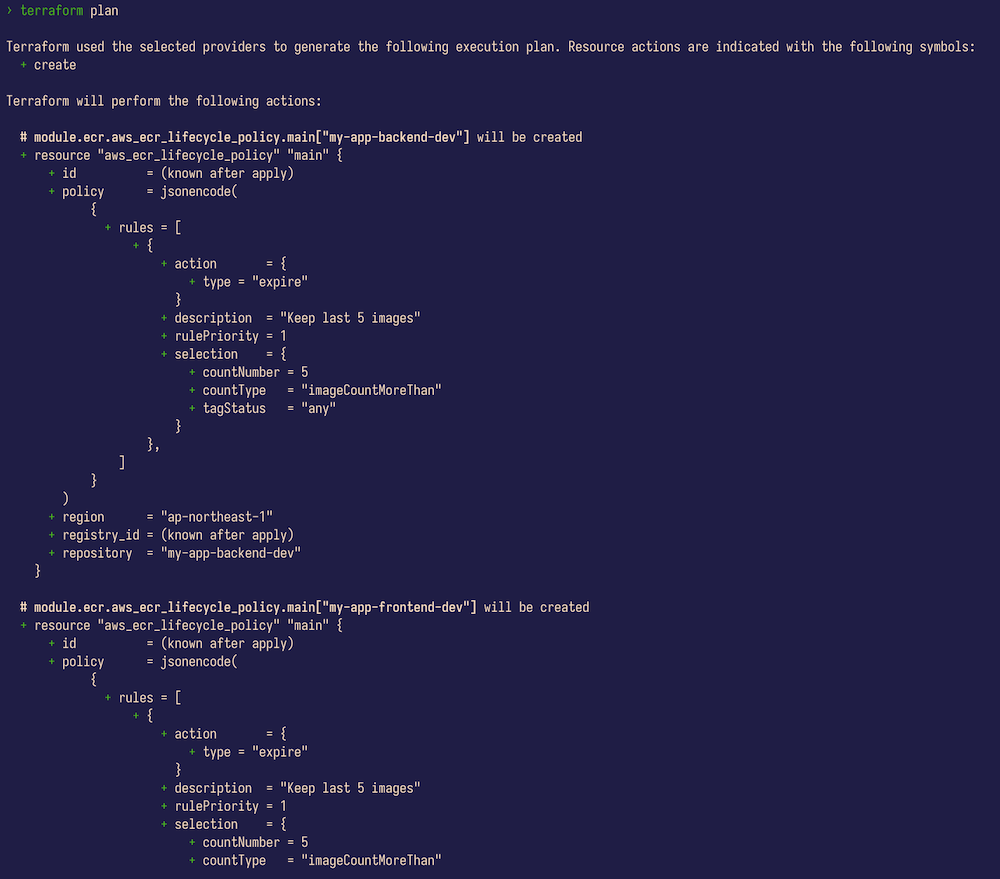
terraform planを実行した画面
・ディレクトリ分離のメリット- 完全な分離: 各環境が独立した設定ファイル、認証情報を持つ
- アクセス制御: 環境ごとに異なるIAM権限を設定できる
- 安全性: 本番環境への誤操作リスクを最小化
- 柔軟性: 環境ごとに異なる設定やリソースを容易に追加できる
- 複数アカウント対応: 環境ごとに異なるAWSアカウントを使用できる
- 将来の拡張性: 次回で解説するリモートバックエンドを環境ごとに独立して設定できる
ワークスペースを環境分離に使ってはいけない(アンチパターン)
Terraformには「ワークスペース」という機能があります。ワークスペースとは、同じTerraformコード(設定ファイル)を使いながら、複数の独立した状態ファイルを管理できる機能です。各ワークスペースは独立した状態ファイルを持ち、ワークスペースを切り替えてどの状態ファイルを操作するかを選択します。つまり、同じコードを使って異なるインフラ環境を作成・管理できます。
この機能は一見すると環境分離に使えそうに思えます。例えば、dev、staging、prodのようなワークスペースを作って環境を分離する方法です。しかし、これは推奨されません*。理由は以下の通りです。
- 1. 単一のバックエンド設定を共有
すべてのワークスペースが同じS3バケットを使用します。本番環境と開発環境で異なるAWSアカウントを使いたい場合、ワークスペースでは対応できません。 - アクセス制御の分離が困難
環境ごとに異なるIAM権限や認証情報を設定できません。開発者に開発環境へのアクセスを許可しつつ、本番環境へのアクセスを制限するといった制御が難しくなります。 - コードの完全な共有
すべての環境が同じコードを使用するため、開発環境で実験的な変更を加えると、誤って本番環境に影響を与える危険性があります。 - 状態ファイルの誤操作リスクが高い
ワークスペースは同じディレクトリ内で環境を切り替えるため、現在どの環境で作業しているか分かりにくく、誤って本番環境にterraform applyを実行してしまうリスクが高まります。ディレクトリ分離でも誤操作のリスクはありますが、シェルプロンプトやエディタのパスで視覚的に確認できるため、リスクは相対的に低くなります。
Terraform公式ドキュメントでも、ワークスペースは「適切なセキュリティ隔離メカニズムではない」と明記されています。
ワークスペースの正しい使い方
では、ワークスペースは何のために使うのでしょうか。ワークスペースは「本番インフラを変更する前に、変更をテストするための並行した環境のコピー」を作成するのに適しています。
典型的な使用例は以下の通りです。
- フィーチャーブランチに対応した一時的なテスト環境
# mainブランチ(本番環境)に対応するデフォルトワークスペース
$ terraform workspace list
* default
# 新機能開発用のフィーチャーブランチを作成
$ git checkout -b feature/add-monitoring
# 対応するワークスペースを作成して、テスト用のインフラをデプロイ
$ terraform workspace new feature-add-monitoring
$ terraform apply
# テストが完了したら、ワークスペースとリソースを削除
$ terraform destroy
$ terraform workspace select default
$ terraform workspace delete feature-add-monitoring
- 本番環境への変更前の検証
# 本番環境のコピーを作成してテスト
$ terraform workspace new production-test
$ terraform apply
# 変更内容を検証
$ terraform plan
# 問題なければ本番環境に適用
$ terraform workspace select default
$ terraform apply
# テスト環境を削除
$ terraform workspace select production-test
$ terraform destroy
$ terraform workspace select default
$ terraform workspace delete production-test
このように、ワークスペースは一時的なテスト環境や検証環境として使用し、テストが終わったら削除するという用途に適しています。環境分離には、前述のディレクトリ分離を使用してください。
おわりに
本記事では、Terraformのコードをモジュール化し、ディレクトリ分離によって環境を適切に管理する方法を学びました。
第15回で作成したフラット構成のコードをVPC、EKS、ECRの3つのモジュールに分割し、開発環境と本番環境でそれぞれ異なるパラメータを渡すことで、コードの重複を避けつつ環境を分離できました。また、ワークスペースは環境分離ではなく、一時的なテスト環境の作成に使うべきであることを学びました。
しかし、現在の構成では状態ファイル(terraform.tfstate)がまだローカルに保存されています。次回(第17回)では、状態ファイルをS3に保存するリモートバックエンドの設定方法を学びます。リモートバックエンドによりチーム全体で状態を共有し、同時実行を防ぐロック機構を実現します。特にTerraform 1.10で導入され、1.11.0で一般公開(GA)され正式にサポートされたS3 native state locking(use_lockfile)について詳しく解説します。
- この記事のキーワード
この記事をシェアしてください
関連記事

「GitHub Actions」で「Terraform」を使用してCI/CD統合を試してみよう
1月6日 6:30

SecretもPulumiで使いこなしたい! PulumiのSecurityを試してみよう
2023年5月26日 6:30
「Terraform」で状態ファイルに「リモートバックエンド」を設定してみよう
2025年12月16日 6:30

TerraformからPulumiへの移行
2023年11月28日 8:41
クラスターを詳細監視する「Container Insights」のセットアップと有効化【前編】
3月10日 6:30

Pulumi Kubernetes Operatorを活用してPulumiのCI/CDを実現しよう
2023年9月13日 6:30
バックナンバー


この記事の筆者

Think ITでは、技術情報が詰まったメールマガジン「Think IT Weekly」の配信サービスを提供しています。メルマガ会員登録を済ませれば、メルマガだけでなく、さまざまな限定特典を入手できるようになります。

