


Windows Phone Tips集 第2弾 第8回
MainPage.xamlの編集とコントロールの追加
MainPage.xamlの編集とコントロールの追加
書き出されるXAMLコードをリスト1のように編集します。
リスト1 編集されたXAMLコード
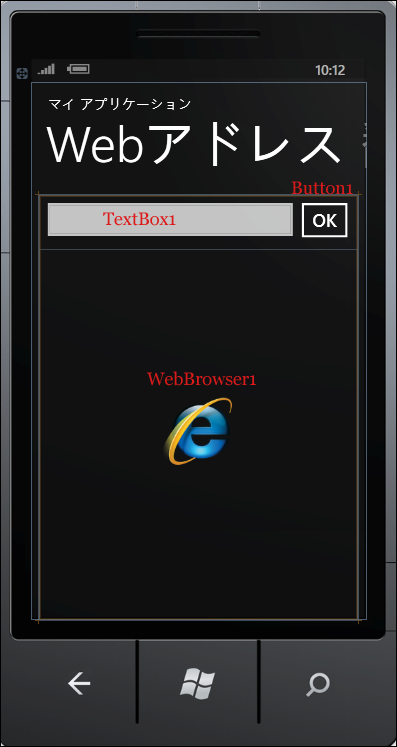
(1)<controls:Pivot >要素の、最初の子要素<controls:PivotItem>のHeaderプロパティに、「Webアドレス」と指定します。その中に、<TextBox>、<Button>、<phone:WebBrowser>要素を配置します。通常は、WebBrowserコントロールのプロパティの[共通]パネルにあるIsScriptEnabledプロパティにチェックを付け、JavaScriptの実行を可能としておかなければ、正常に表示されないサイトが出てくるのですが、Windows Phone SDK 7.1 RTWでは、このプロパティにチェックを入れ、サイトに表示されているリンクをタップすると、該当するページに遷移せず、リンクが消え、ただの文字列が選択状態になる不具合が出ていましたので、今回のサンプルでは、IsScriptEnabledプロパティにチェックは付けていません。図6のようなレイアウトになります。
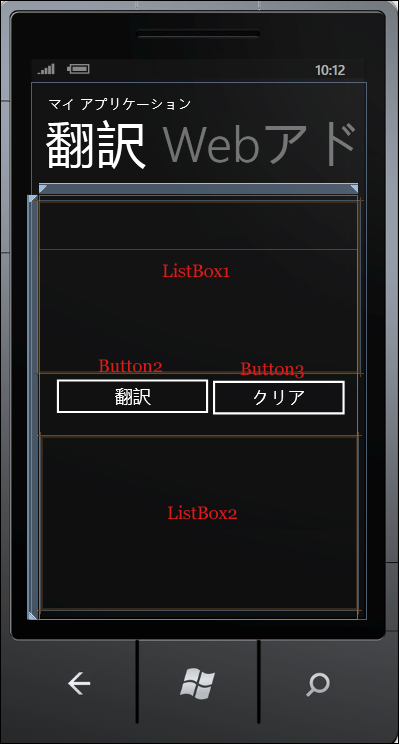
(2)2番目のPivot itemの<controls:PivotItem>要素のHeaderプロパティに「翻訳」と指定します。子要素として<ListBox>要素を2つと<Button>要素を2つ配置します。図7のようなレイアウトになります。
<phone:PhoneApplicationPage
  x:Class="SelectSentenceTranslate.MainPage"
  xmlns="http://schemas.microsoft.com/winfx/2006/xaml/presentation"
  xmlns:x="http://schemas.microsoft.com/winfx/2006/xaml"
  xmlns:phone="clr-namespace:Microsoft.Phone.Controls;assembly=Microsoft.Phone"
  xmlns:shell="clr-namespace:Microsoft.Phone.Shell;assembly=Microsoft.Phone"
  xmlns:controls="clr-namespace:Microsoft.Phone.Controls;assembly=Microsoft.Phone.Controls"
  xmlns:d="http://schemas.microsoft.com/expression/blend/2008"
  xmlns:mc="http://schemas.openxmlformats.org/markup-compatibility/2006"
  mc:Ignorable="d" d:DesignWidth="480" d:DesignHeight="768"
  d:DataContext="{d:DesignData SampleData/MainViewModelSampleData.xaml}"
  FontFamily="{StaticResource PhoneFontFamilyNormal}"
  FontSize="{StaticResource PhoneFontSizeNormal}"
  Foreground="{StaticResource PhoneForegroundBrush}"
  SupportedOrientations="Portrait"  Orientation="Portrait"
  shell:SystemTray.IsVisible="True" Language="ja-JP">

  <!--LayoutRoot は、すべてのページ コンテンツが配置されるルート グリッドです-->
  <Grid x:Name="LayoutRoot" Background="Transparent">
    <!--ピボット コントロール-->
    <controls:Pivot Title="マイ アプリケーション">
      <!--ピボット アイテム 1-->
      <controls:PivotItem Header="Webアドレス"> ■(1)
        <!--テキストの折り返しを行う 2 行リスト-->
        <Grid>
          <TextBox Height="71" HorizontalAlignment="Left" Name="TextBox1" VerticalAlignment="Top" Width="374" /> ■(1)
          <Button Content="OK" Height="73" HorizontalAlignment="Left" Name="Button1" VerticalAlignment="Top" Width="89" Margin="363,0,0,0" /> ■(1)
          <phone:WebBrowser Name="WebBrowser1" Height="530" Margin="0,77,0,0"/> ■(1)
        </Grid>
      </controls:PivotItem> ■(1)
      <!--ピボット アイテム 2-->
      <controls:PivotItem Header="翻訳"> ■(2)
        <!--テキストの折り返しを行わない 3 行リスト-->
      <Grid>
        <ListBox Height="246" Margin="-1,9,-3,352" Name="ListBox1"  Width="460" /> ■(2)
        <Button Content="翻訳" Height="72" HorizontalAlignment="Left"  Name="Button2" VerticalAlignment="Top" Width="240" Margin="13,252,0,0" />"> ■(2)
        <ListBox Height="248"  Margin="3,345,0,14" Name="ListBox2" Width="453" /> ■(2)
        <Button Content="クリア" Height="72" HorizontalAlignment="Left" Margin="236,254,0,0" Name="Button3" VerticalAlignment="Top" Width="212" /> ■(2)
      </Grid>
      </controls:PivotItem>
    </controls:Pivot>
  </Grid>
  <!--ApplicationBar の使用法を示すサンプル コード-->
~コード略~
</phone:PhoneApplicationPage>
|
| 図6:「Webアドレス」のPivotItemのページレイアウト(クリックで拡大) |
|
| 図7:「翻訳」のPivotItemのページレイアウト(クリックで拡大) |
次に、MainPage.xamlを展開して表示される、MainPage.xaml.vbをダブルクリックしてリスト2のコードを記述します。
ロジックコードを記述する
リスト2 (MainPage.xaml.vb)
Option Strict On

Imports System.Windows.Documents
Imports System.Windows.Input
Imports System.Windows.Media
Imports System.Windows.Media.Animation
Imports System.Windows.Shapes
Imports Microsoft.Phone.Controls
Imports System.Xml.Linq

Partial Public Class MainPage
  Inherits PhoneApplicationPage
  ' コンストラクター
  Public Sub New()
    InitializeComponent()

    ' ListBox コントロールのデータ コンテキストをサンプル データに設定します
    DataContext = App.ViewModel
  End Sub

「Bing Developer Center より取得したApplicationID」を定数変数として宣言しておきます。
  Const myAppID As String = " Bing Developer Center より取得したApplicationID"

TextBoxクラス型のメンバ変数myTextBoxを宣言します。
  Dim myTextBox As TextBox

TextBlockクラス型のメンバ変数myTextBlockを宣言します。
  Dim myTextBlock As TextBlock
ページが読み込まれた時の処理
TextBox1のTextプロパティに米国のMicrosoftのURLを指定しておきます。
新しいTextBoxのインスタンスmyTextBoxオブジェクトを作成します。
Widthプロパティを指定し、HeightプロパティにはAutoを指定します。Autoを指定する場合は、Double.NaNと指定します。TextWrappingiプロパティに回り込み可を指定します。AcceptReturnにTrueを指定し、改行の入力を可能にします。
ListBox1にAddメソッドでプロパティの設定されたmyTextBox1オブジェクトを追加します。
新しいTextBlockのインスタンスmyTextBlockを作成します。
Widthプロパティを指定し、HeightにはAutoを表すDouble.NaNを指定します。TextWrappingプロパティに回り込み可を指定します。文字サイズは26、文字色にはBlueを指定しています。
ListBox2にAddメソッドでプロパティの設定されたmyTextBlockオブジェクトを追加します
  Private Sub MainPage_Loaded(ByVal sender As Object, ByVal e As RoutedEventArgs) Handles Me.Loaded
    If Not App.ViewModel.IsDataLoaded Then
      App.ViewModel.LoadData()
    End If
    TextBox1.Text = "http://www.microsoft.com/en-us/default.aspx"

    myTextBox = New TextBox
    With myTextBox
      .Width = 456
      .Height = Double.NaN
      .TextWrapping = TextWrapping.Wrap
      .AcceptsReturn = True
    End With

    ListBox1.Items.Add(myTextBox)
    myTextBlock = New TextBlock
    With myTextBlock
      .width = 456
      .Height = Double.NaN
      .TextWrapping = TextWrapping.Wrap
      .FontSize = 26
      .Foreground = New SolidColorBrush(Colors.Blue)
    End With

    ListBox2.Items.Add(myTextBlock)
  End Sub
[OK]ボタンがタップされた時の処理
TextBox1に入力されているサイトに遷移します。
  Private Sub Button1_Click(sender As System.Object, e As System.Windows.RoutedEventArgs) Handles Button1.Click
    WebBrowser1.Navigate(New Uri(TextBox1.Text, UriKind.Absolute))
  End Sub
2ページ目の[翻訳]ボタンがタップされた時の処理
API へのリクエストは、appID、text、from、toの条件を下記のような URL で指定します。(REST)
appIDには「Bing Developer Center より取得したApplicationID」を指定します。textには翻訳したい英文(myTextBox.Text)を指定します。fromには翻訳する言語を指定し(ここでは英語でenを指定)、toには翻訳された言語(ここでは日本語のja)を指定します。
  Dim myTranslate As String = String.Format("http://api.microsofttranslator.com/v2/Http.svc/Translate?appId={0}&text={1}&from=en&to=ja", myAppID, myTextBox.Text)
新しいWebClientのインスタンスmyWebClientオブジェクトを生成します。DownloadStringAsyncメソッドで、Uri として指定したリソースをダウンロードします。絶対Uriで指定します。
AddHandler ステートメントでダウンロードが完了した DownloadStringCompleted イベントに、イベント ハンドラーを追加します。イベント ハンドラー内では、ダウンロードされた文字列としての結果 XML(resultArgs.Result) をXElement.Parseメソッドで文字列として読み込みます。myTextBlockオブジェクトのTextプロパティに読み込んだXMLの、一番初めの要素の値を指定します。これで、英語から日本語に翻訳された結果がListBox2内のmyTextBlockオブジェクト内に表示されます。
  Private Sub Button2_Click(sender As System.Object, e As System.Windows.RoutedEventArgs) Handles Button2.Click
    Try
      Dim myTranslate As String = String.Format("http://api.microsofttranslator.com/v2/Http.svc/Translate?appId={0}&text={1}&from=en&to=ja", myAppID, myTextBox.Text)
      Dim myWebClient As New WebClient
      myWebClient.DownloadStringAsync(New Uri(myTranslate, UriKind.Absolute))

      AddHandler myWebClient.DownloadStringCompleted, Sub(resultSender As Object, resultArgs As DownloadStringCompletedEventArgs)
          Dim doc As XDocument = XDocument.Parse(resultArgs.Result)
          myTextBlock.Text = doc.Elements.First.Value
                      End Sub
    Catch
      MessageBox.Show("コピーがうまくできていません。やり直してください。")
      Exit Sub
    End Try
  End Sub
2ページ目の[クリア]ボタンがタップされた時の処理
myTextBoxとmyTextBlockオブジェクトのTextプロパティの値を空にします。
  Private Sub Button3_Click(sender As System.Object, e As System.Windows.RoutedEventArgs) Handles Button3.Click
    myTextBox.Text = String.Empty
    myTextBlock.Text = String.Empty
  End Sub
End Class
「英文Webの選択した文章を日本語に翻訳する」サンプルプログラム
You don't have access to download this file.
「QRコードを生成する」サンプルプログラム
You don't have access to download this file.
- この記事のキーワード
この記事をシェアしてください
バックナンバー


この記事の筆者

Think ITでは、技術情報が詰まったメールマガジン「Think IT Weekly」の配信サービスを提供しています。メルマガ会員登録を済ませれば、メルマガだけでなく、さまざまな限定特典を入手できるようになります。

