


速攻攻略 Kinect v2 プログラミング入門 第3回
ウインドウが読み込まれた時の処理
ウインドウが読み込まれた時の処理
次に、ウインドウが読み込まれた際の処理を記述します。
リスト3 ウインドウが読み込まれた際の処理(MainWindow.xaml.vbの一部、リスト2の続き)
    Private Sub MainWindow_Loaded(sender As Object, e As RoutedEventArgs) Handles Me.Loaded
        myKinectSensor = KinectSensor.GetDefault   (1)

        If myKinectSensor Is Nothing = False Then
            myDepthFrameReader = myKinectSensor.DepthFrameSource.OpenReader   (2)
            Dim myDepthFrameDescripton As FrameDescription = myKinectSensor.DepthFrameSource.FrameDescription   (3)

            DepthImageBitmap = New WriteableBitmap(myDepthFrameDescripton.Width, myDepthFrameDescripton.Height, 96.0, 96.0, PixelFormats.Gray8, Nothing)   (4)
            myBytesPerPixel = myDepthFrameDescripton.BytesPerPixel   (5)
            DepthImageFrameData = New UShort(myDepthFrameDescripton.Width * myDepthFrameDescripton.Height - 1) {}   (6)
            DepthImageBitmapRect = New Int32Rect(0, 0, myDepthFrameDescripton.Width, myDepthFrameDescripton.Height)   (7)
            DepthImageStride = myDepthFrameDescripton.Width * myBytesPerPixel   (8)
            AddHandler myDepthFrameReader.FrameArrived, AddressOf myDepthFrameReader_FrameArrived   (9)
            myKinectSensor.Open()   (10)
        End If
    End Sub
- まずKinectセンサーを使用可能にします。Kinectセンサーが使用可能な状態にある場合は、以下の処理を行います。
- 深度(距離)フレームのソースを取得する、DepthFrameSourceのOpenReaderメソッドで、深度(距離)フレームのソースフレームのリーダーを開きます。
- KinectSensorからのフレームのプロパティを表わすクラスである、FrameDescriptionクラス型の変数myDepthFrameDescriptonを宣言し、myKinectSensor.DepthFrameSource.FrameDescriptionで、深度(距離)フレームソースの深度(距離)フレームのプロパティを取得します。
- 次に、WriteableBitmapのパラメータで初期化された、新しいインスタンス、DepthImageBitmapオブジェクトを作成します。WriteableBitmapの書式については、連載の第2回目を参照してください。今回はPixelFormatsに「Gray8」を指定しています。「PixelFormats.Gray8」は、ピクセルあたりのビット数が8で256段階のグレイスケール チャネルを表示する「Gray8」ピクセル形式を表します。
- メンバー変数myBytesPerPixelに、深度(距離)データからのピクセル データのサイズ(ピクセルあたりのバイト)を格納します。「2」という値が格納されます。グレイスケールは16ビットで、BytesPerPixelプロパティで、ピクセルあたりのバイト数を取得すると、16÷8の「2」が取得できます。
- 要素の個数が、深度(距離)フレームのWidthとHeightの積であるUShort型の配列を確保し、メンバー変数DepthImageFrameDataに格納します。
- Int32Rectのパラメータで初期化された、新しいインスタンスDepthImageBitmapRectオブジェクトを作成します。Int32Rectの書式については、第2回目を参照してください。
- メンバー変数myBytesPerPixelが格納している値「2」と、深度(距離)フレームのWidthである「512」を乗算した値(1024)を、メンバー変数DepthImageStrideに格納します。
- AddHandlerステートメントで、DepthFrameReaderのFrameArrivedイベントにイベントハンドラを指定します。FrameArrivedイベントは、深度(距離)フレームが到着した時に発生するイベントです。
- OpenメソッドでKinectセンサーを開きます。
深度(距離)フレームが到着した時に発生するイベント
リスト3の最後で指定したイベントハンドラの内容です。
リスト4 深度(距離)フレーム到着時の処理(MainWindow.xaml.vbの一部、リスト3の続き)
    Private Sub myDepthFrameReader_FrameArrived(sender As Object, e As DepthFrameArrivedEventArgs)
        Using myDepthFrame As DepthFrame = e.FrameReference.AcquireFrame   (1)
            If myDepthFrame Is Nothing = False Then
                myDepthFrame.CopyFrameDataToArray(DepthImageFrameData)   (2)
                DepthImageBitmap.WritePixels(DepthImageBitmapRect, DepthImageFrameData, DepthImageStride, 0)   (3)
                Image1.Source = DepthImageBitmap   (4)
            End If
        End Using
    End Sub
- e.FrameReference.AcquireFrameメソッドで深度(距離)フレームを取得し、myDepthFrameで参照します。
- CopyFrameDataToArrayメソッドで、深度(距離)フレームデータをUShort型配列にコピーします。書式は下記の通りです。
CopyFrameDataToArray(frameData)
frameDataには深度(距離)フレームデータをコピーする先の配列を指定します。この場合はUShort型の配列変数DepthImageFrameDataを指定しています。 - DepthImageBitmap(WriteableBitmapクラス)のWritePixelsメソッドで、ビットマップの指定した領域内のピクセルを更新します。WritePixelsの書式については、第2回目を参照してください。
- Image1のSourceプロパティにDepthImageBitmapオブジェクトを指定します。これで深度(距離)センサーからの画像が表示されます。
ウインドウが閉じられる時の処理
最後に、ウインドウが閉じられる際の処理を記述します。
リスト5 ウインドウを閉じる際の処理(MainWindow.xaml.vbの一部、リスト4の続き)
    Private Sub MainWindow_Closing(sender As Object, e As ComponentModel.CancelEventArgs) Handles Me.Closing
        If myDepthFrameReader Is Nothing = False Then
            myDepthFrameReader.Dispose()   (1)
            myDepthFrameReader = Nothing
        End If

        If myKinectSensor Is Nothing = False Then
            myKinectSensor.Close()   (2)
            myKinectSensor = Nothing
        End If
    End Sub
End Class
- myDepthFrameReaderをDisposeし、全ての関連付けから解放します。
- Kinectセンサーも閉じ、全ての関連付けから解放します。
上記のプログラムを実行すると、図2のように表示されます。
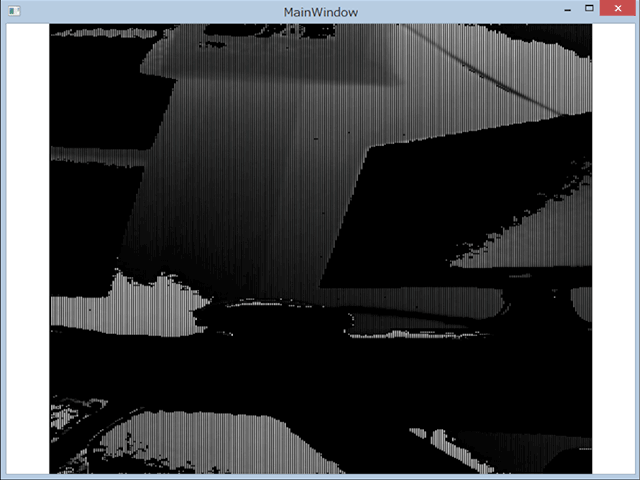
図2: 深度センサーからの画像が表示された(クリックで拡大)
次回は、赤外線画像の取り込みにチャレンジします。
Kinect v2の深度センサーから取り込んだ画像を表示する
You don't have access to download this file.
- この記事のキーワード
この記事をシェアしてください
関連記事


バックナンバー


この記事の筆者

Think ITでは、技術情報が詰まったメールマガジン「Think IT Weekly」の配信サービスを提供しています。メルマガ会員登録を済ませれば、メルマガだけでなく、さまざまな限定特典を入手できるようになります。

