


空白のページの作成(SettingPage.xaml)
空白のページの作成(SettingPage.xaml)
VS2013のメニューから、[プロジェクト]−[新しい項目の追加]と選択し、表示される「新しい項目の追加」画面で。左のWindows ストアを選択し、右の欄から「空白のページ」を選択します。「名前」には「SettingPage.xaml」と指定し、[追加] ボタンをクリックします。「SettingPage.xaml」は各種設定を行うページです。
コントロールのレイアウト(SettingPage.xaml)
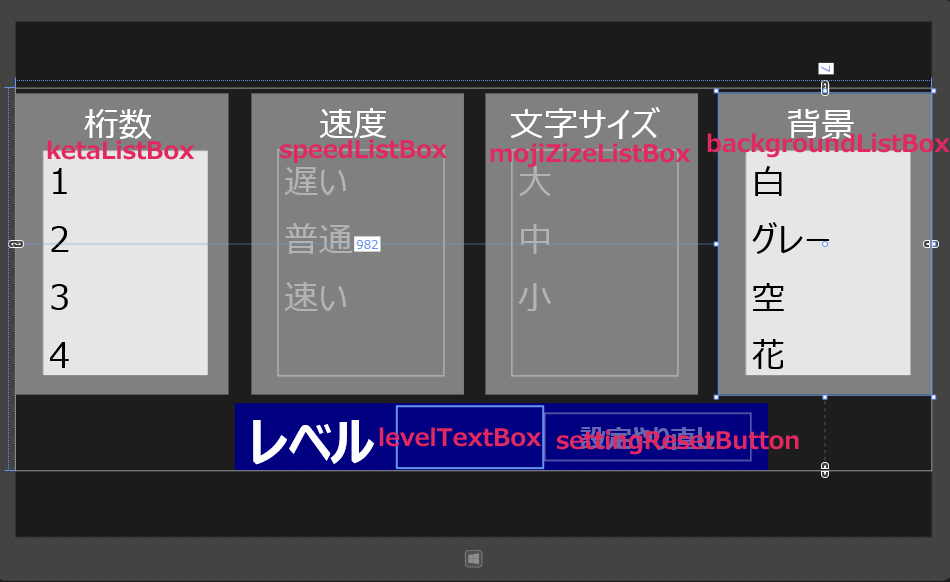
ツールボックスからデザイン画面上に、各コントロールを配置します。
書き出されるXAMLコードはリスト2のようになります。
(1)Grid要素全体をViewBox要素で囲みます。ViewBox要素は、伸縮およびスケーリングを実行して単一の子を使用可能な領域全体に引き伸ばすことができるコンテンツ・デコレータを定義します。
(2)StackPanel要素を配置し、Orientationプロパティに「Horizontal」を指定して、オブジェクトのスタック方向を水平方向とします。背景色(Background)に「Gray」を指定します。その子要素として項目名(桁数)となるTextBlock要素を配置します。
次に、「ketaListBox」という名前のListBoxを配置。子要素であるListBoxItem要素を5つ配置して、Contentプロパティに1から5までの値を指定します。ListBoxItem要素を設定は、ListboBox要素のプロパティの[共通]パネル内にあるItems(コレクション)の横に表示されている[・・・]ボタンをタップすることで設定することができます。
(3)StackPanel要素を配置し、Orientationプロパティに「Horizontal」を指定して、オブジェクトのスタック方向を水平方向とします。背景色(Background)に「Gray」を指定します。その子要素として項目名(速度)となるTextBlock要素を配置します。
次に、名前が「speedListBox」というListBoxを配置し、子要素であるListBoxItem要素を3つ配置し、Contentプロパティに「遅い」、「普通」、「速い」の値を指定します。このListBoxは最初の状態では選択不可としておきます。
(4)StackPanel要素を配置し、Orientationプロパティに「Horizontal」を指定して、オブジェクトのスタック方向を水平方向とします。背景色(Background)に「Gray」を指定します。その子要素として項目名(文字サイズ)となるTextBlock要素を配置します。
次に、「mojiSizeListBox」という名前のListBoxを配置。子要素であるListBoxItem要素を3つ配置し、Contentプロパティに「大」、「中」、「小」の値を指定します。このListBoxは最初の状態では選択不可としておきます。
(5)StackPanel要素を配置し、Orientationプロパティに「Horizontal」を指定して、オブジェクトのスタック方向を水平方向とします。背景色(Background)に「Gray」を指定します。その子要素として項目名(背景)となるTextBlock要素を配置します。
次に、「backgroudnListBox」という名前のListBoxを配置し、子要素であるListBoxItem要素を5つ配置し、Contentプロパティに「白」、「グレー」、「空」、「花」、「しょう子」の値を指定します。
(6)StackPanel要素を配置し、Orientationプロパティに「Horizontal」を指定して、オブジェクトのスタック方向を水平方向とします。背景色(Background)に「Navy」を指定します。その子要素として項目名(レベル)となるTextBlock要素を配置します。
次に名前が「levelTextBlock」というTextBlock要素を配置します。最後に、名前がsettingResetButtonというButton要素を配置し、Contentプロパティに「設定やり直し」と指定します。このボタンは最初の状態では使用不可としておきます。
以上、全てをレイアウトしたのが図7になります。
リスト2 書き出されたXAMLコード(SettingPage.xaml)
<Page
  x:Class="DynamicVisualAcuityMentalArithmetic.SettingPage"
  xmlns="http://schemas.microsoft.com/winfx/2006/xaml/presentation"
  xmlns:x="http://schemas.microsoft.com/winfx/2006/xaml"
  xmlns:local="using:DynamicVisualAcuityMentalArithmetic"
  xmlns:d="http://schemas.microsoft.com/expression/blend/2008"
  xmlns:mc="http://schemas.openxmlformats.org/markup-compatibility/2006"
  mc:Ignorable="d">
  <Viewbox>■(1)
    <Grid Background="{ThemeResource ApplicationPageBackgroundThemeBrush}">
      <StackPanel HorizontalAlignment="Left" Height="421" Margin="0,7,0,0" VerticalAlignment="Top" Width="297" Background="Gray">■(2)
        <TextBlock HorizontalAlignment="Center" Height="68" Margin="95,10,64,0" TextWrapping="Wrap" Text="桁数" Width="138" FontFamily="Meiryo UI" FontSize="48"/>■(2)
        <ListBox x:Name="ketaListBox" HorizontalAlignment="Left" Height="318" Margin="36,0,0,0" Width="234" FontFamily="Global User Interface">■(2)
          <ListBoxItem Content="1" FontSize="48" FontFamily="Meiryo UI"/>■(2)
          <ListBoxItem Content="2" FontSize="48" FontFamily="Meiryo UI"/>■(2)
          <ListBoxItem Content="3" FontSize="48" FontFamily="Meiryo UI"/>■(2)
          <ListBoxItem Content="4" FontSize="48" FontFamily="Meiryo UI"/>■(2)
          <ListBoxItem Content="5" FontSize="48" FontFamily="Meiryo UI"/>■(2)
        </ListBox>■(2)
      </StackPanel>■(2)
      <StackPanel HorizontalAlignment="Left" Height="421" Margin="329,7,0,0" VerticalAlignment="Top" Width="297" Background="Gray">■(3)
        <TextBlock HorizontalAlignment="Center" Height="68" Margin="95,10,64,0" TextWrapping="Wrap" Text="速度" Width="138" FontFamily="Meiryo UI" FontSize="48"/>■(3)
          <ListBox x:Name="speedListBox" HorizontalAlignment="Left" Height="318" Margin="36,0,0,0" Width="234" FontFamily="Global User Interface" IsEnabled="False">■(3)
          <ListBoxItem Content="遅い" FontSize="48" FontFamily="Meiryo UI"/>■(3)
          <ListBoxItem Content="普通" FontSize="48" FontFamily="Meiryo UI"/>■(3)
          <ListBoxItem Content="速い" FontSize="48" FontFamily="Meiryo UI"/>■(3)
        </ListBox>■(3)
      </StackPanel>■(3)
      <StackPanel HorizontalAlignment="Left" Height="421" Margin="656,7,0,0" VerticalAlignment="Top" Width="297" Background="Gray" >■(4)
        <TextBlock HorizontalAlignment="Center" Height="68" Margin="34,10,30,0" TextWrapping="Wrap" Text="文字サイズ" Width="233" FontFamily="Meiryo UI" FontSize="48"/>■(4)
        <ListBox x:Name="mojiSizeListBox" HorizontalAlignment="Left" Height="318" Margin="36,0,0,0" Width="234" FontFamily="Global User Interface" IsEnabled="False">■(4)
          <ListBoxItem Content="大" FontSize="48" FontFamily="Meiryo UI"/>■(4)
          <ListBoxItem Content="中" FontSize="48" FontFamily="Meiryo UI"/>■(4)
          <ListBoxItem Content="小" FontSize="48" FontFamily="Meiryo UI"/>■(4)
        </ListBox>■(4)
      </StackPanel>■(4)
      <StackPanel HorizontalAlignment="Left" Height="421" Margin="982,7,0,0" VerticalAlignment="Top" Width="297" Background="Gray">■(5)
        <TextBlock HorizontalAlignment="Center" Height="68" Margin="95,10,64,0" TextWrapping="Wrap" Text="背景" Width="138" FontFamily="Meiryo UI" FontSize="48"/>■(5)
        <ListBox x:Name="backgroundListBox" HorizontalAlignment="Left" Height="318" Margin="36,0,0,0" Width="234" FontFamily="Global User Interface">■(5)
          <ListBoxItem Content="白" FontSize="48" FontFamily="Meiryo UI"/>■(5)
          <ListBoxItem Content="グレー" FontSize="48" FontFamily="Meiryo UI"/>■(5)
          <ListBoxItem Content="空" FontSize="48" FontFamily="Meiryo UI"/>■(5)
          <ListBoxItem Content="花" FontSize="48" FontFamily="Meiryo UI"/>■(5)
          <ListBoxItem Content="しょう子" FontSize="48" FontFamily="Meiryo UI"/>■(5)
        </ListBox>■(5)
      </StackPanel>■(5)
      <StackPanel HorizontalAlignment="Left" Height="94" Margin="306,440,0,0" VerticalAlignment="Top" Width="745" Background="Navy" Orientation="Horizontal">■(6)
        <TextBlock Height="85" Margin="20,4,0,0" TextWrapping="Wrap" Text="レベル" VerticalAlignment="Top" Width="208" FontFamily="Meiryo UI" FontSize="72" FontWeight="Bold"/>■(6)
        <TextBlock x:Name="levelTextBlock" Height="85" Margin="0,5,0,0" TextWrapping="Wrap" VerticalAlignment="Top" Width="201" FontFamily="Meiryo UI" FontSize="72" Foreground="Crimson" FontWeight="Bold"/>■(6)
        <Button x:Name="settingResetButton" Content="設定やり直し" Height="74" Margin="0,10,0,0" VerticalAlignment="Top" Width="296" FontFamily="Meiryo UI" FontSize="36" IsEnabled="False"/>■(6)
      </StackPanel>■(6)
    </Grid>
  </Viewbox>■(1)
</Page>
空白のページの作成(goPage.xaml)
VS2013のメニューから、[プロジェクト]−[新しい項目の追加]と選択し、表示される「新しい項目の追加」画面で。左のWindows ストアを選択し、右の欄から「空白のページ」を選択します。「名前」には「goPage.xaml」と指定し、[追加] ボタンをクリックします。「goPage.xaml」は設定した条件でランダムな数字が左から右に流れてくるページです。
コントロールのレイアウト(goPage.xaml)
ツールボックスからデザイン画面上に、各コントロールを配置します。
書き出されるXAMLコードはリスト3のようになります。
リスト3 書き出されたXAMLコード(goPage.xaml)
Page.Resourcesプロパティ要素内に3つのDataTemplate要素を配置します。名前は上から「skyGridViewTemplate」、次に「flowerGridViewTemplate」、最後に「syokoGridViewTemplate」として、これらの子要素にImageを配置します。Sourceプロパティには「画像名」をバインドしておきます。「画像名」はVBコードのクラス内で定義されたプロパティ名です(後述)。「設定」画面の「背景」に「空」や「花」、「しょう子」を選択した際に、GridView要素のItemTemplateで参照するテンプレートを切り替えて表示します。
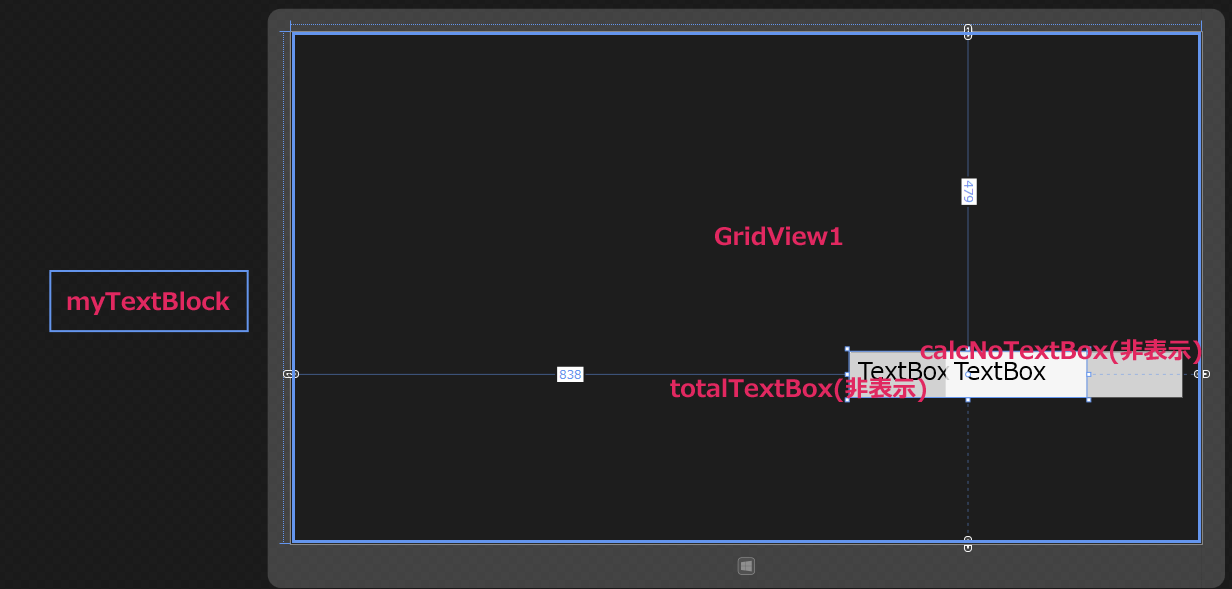
「GridView1」という名前のGridView要素を配置します。
「myTextBlock」という名前のTextBlock要素を配置します。ランダムな数字を表示させて、左から右に流れていくTextBlock要素です。
「totalTextBox」という名前のTextBox要素を配置します。この要素は非表示で、流れてくる数値の合計を入れておきます。
「calcNoTextBoxd」という名前のTextBoxを配置します。個の要素は非表示で、数字が何回流れてきたかの数字を入れておきます。
以上、全てをレイアウトしたのが図8になります。
<Page
  x:Class="DynamicVisualAcuityMentalArithmetic.goPage"
  xmlns="http://schemas.microsoft.com/winfx/2006/xaml/presentation"
  xmlns:x="http://schemas.microsoft.com/winfx/2006/xaml"
  xmlns:local="using:DynamicVisualAcuityMentalArithmetic"
  xmlns:d="http://schemas.microsoft.com/expression/blend/2008"
  xmlns:mc="http://schemas.openxmlformats.org/markup-compatibility/2006"
  mc:Ignorable="d">
    <Page.Resources>
    <DataTemplate x:Key="skyGridViewTemplate">
      <Image Width="307" Height="240" Source="{Binding 画像名}"/>
    </DataTemplate>
    <DataTemplate x:Key="flowerGridViewTemplate">
      <Image Width="200" Height="200" Source="{Binding 画像名}"/>
    </DataTemplate>
    <DataTemplate x:Key="syokoGridViewTemplate">
      <Image Width="141" Height="274" Source="{Binding 画像名}"/>
    </DataTemplate>
  </Page.Resources>
  <Grid x:Name="LayoutRoot" Background="{ThemeResource ApplicationPageBackgroundThemeBrush}">
    <GridView x:Name="GridView1" HorizontalAlignment="Left" Height="768" VerticalAlignment="Top" Width="1366"  FlowDirection="LeftToRight"/>
    <TextBlock x:Name="myTextBox" HorizontalAlignment="Left" Height="89" Margin="-359,359,0,0" TextWrapping="Wrap" VerticalAlignment="Top" Width="292" FontFamily="Meiryo UI" FontSize="72" FontWeight="Bold" RenderTransformOrigin="0.5,0.5" Foreground="Black">
      <TextBlock.RenderTransform>
        <CompositeTransform/>
      </TextBlock.RenderTransform>
    </TextBlock>
    <TextBox x:Name="totalTextBox" HorizontalAlignment="Left" Height="69" Margin="838,479,0,0" TextWrapping="Wrap" Text="TextBox" VerticalAlignment="Top" Width="355" FontFamily="Meiryo UI" FontSize="36" Visibility="Collapsed"/>
    <TextBox x:Name="calcNoTextBox" HorizontalAlignment="Left" Height="69" Margin="982,479,0,0" TextWrapping="Wrap" Text="TextBox" VerticalAlignment="Top" Width="355" FontFamily="Meiryo UI" FontSize="36" Visibility="Collapsed"/>
  </Grid>
</Page>
- この記事のキーワード
この記事をシェアしてください
バックナンバー


この記事の筆者

Think ITでは、技術情報が詰まったメールマガジン「Think IT Weekly」の配信サービスを提供しています。メルマガ会員登録を済ませれば、メルマガだけでなく、さまざまな限定特典を入手できるようになります。

